#載入組件
[System.Reflection.Assembly]::LoadWithPartialName("Microsoft.AnalysisServices")
#新增一個AnalysisServices的server物件
$server = New-Object Microsoft.AnalysisServices.Server
#連到instance
$server.connect("WINXP")
#找出名稱為QACube的database
$database=$server.databases["QACube"]
#找出名稱為QACube的Cube
$cube=$database.cubes["QACube"]
#找出名稱為Fact RYO的measuregroup
$measuregroup=$cube.measuregroups["Fact RYO"]
#找出名稱為Fact RYO的measuregroup
$partition=$measuregroup.partitions
#select所有partition的name,LastProcessed,DataSource,StorageMode
$partition|select-object name,LastProcessed,DataSource,StorageMode
2011年4月10日 星期日
2011年4月2日 星期六
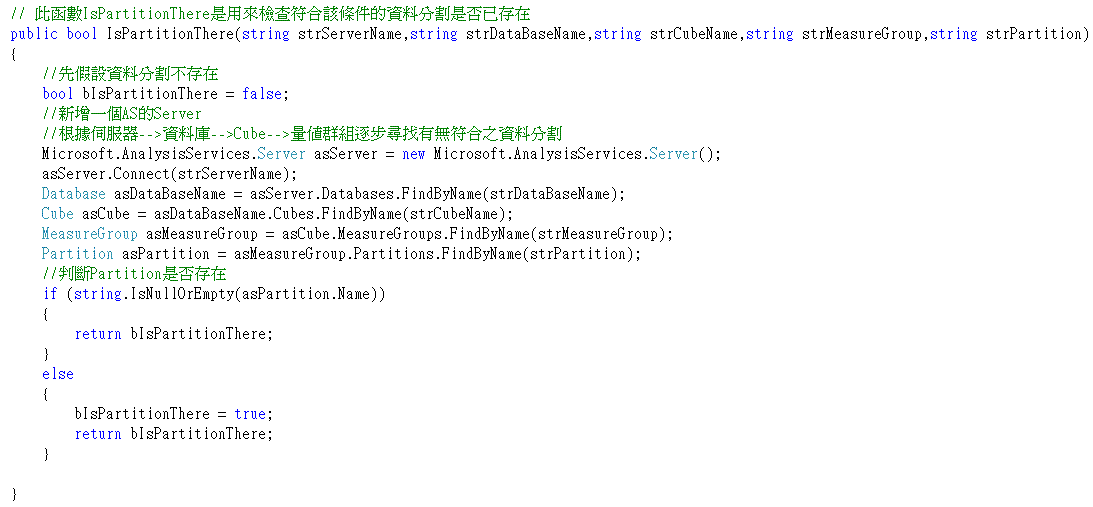
AMO學習-判斷Partition是否已存在
2011年3月30日 星期三
AMO學習-建立新的Partition
今天寫了一個非常簡單的Partition分割程式
Server server = new Server();
server.Connect(@"data source=localhost");
Database db = server.Databases["RYOOLAP"];
Cube cubes = db.Cubes["Cube"];
MeasureGroup mg = cubes.MeasureGroups["FactALL"];
Partition pt = mg.Partitions.Add("Partition9901");
pt.Source = new QueryBinding("CRIM", "SELECT * FROM [dbo].[FactALL] WHERE All_SSYM = '9901' ");
pt.Update();
pt.Process();
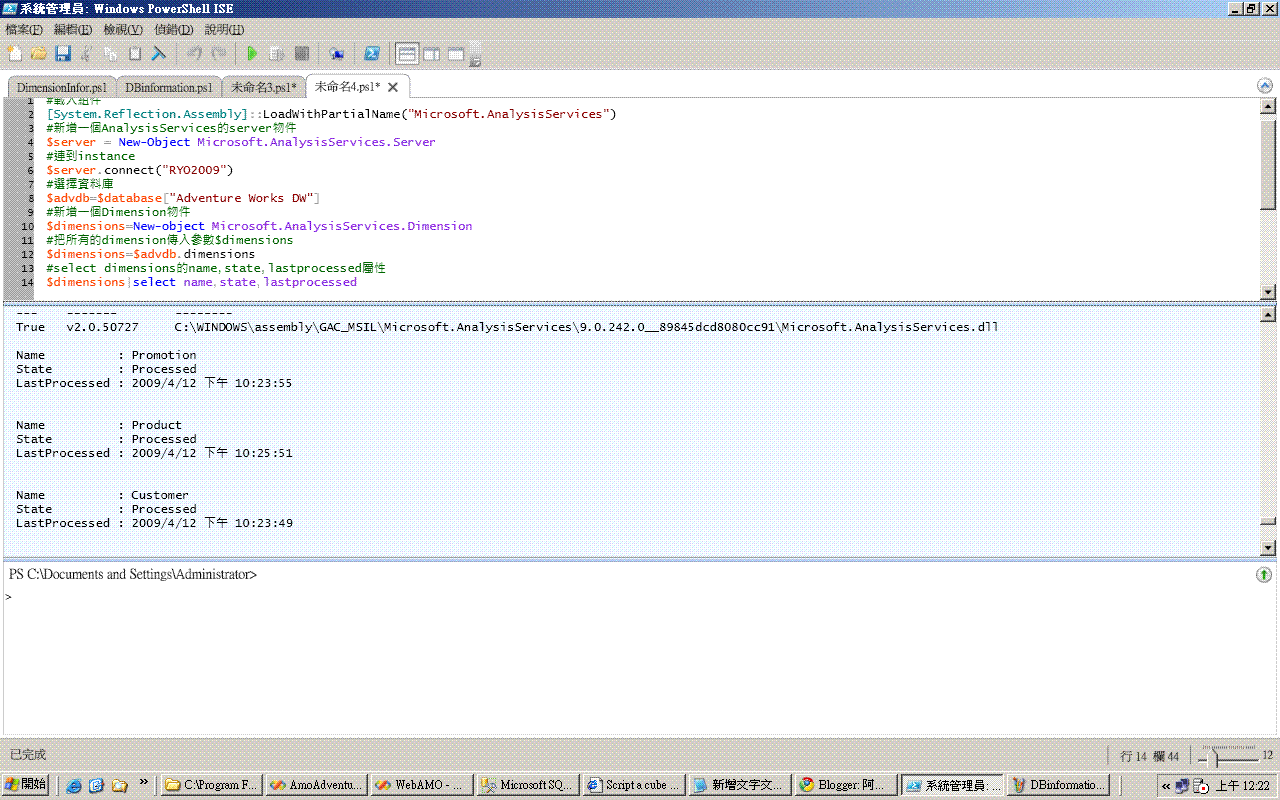
AMO學習-使用POWERSHELL去讀取所有AnalysisServices的資訊
由於也有練習POWERSHELL,之前又在網路上看到有人利用POWERSHELL去執行AMO,
於是臨機一動,乾脆以後都用POWERSHELL去呼叫AMO好了,如此一次兩得。
#載入組件
[System.Reflection.Assembly]::LoadWithPartialName("Microsoft.AnalysisServices")
#新增一個AnalysisServices的server物件
$server = New-Object Microsoft.AnalysisServices.Server
#連到instance
$server.connect("RYO2009")
#把所有的databases傳入參數$database
$database=$server.databases
#select database的name屬性
$database|select-object name

#載入組件
[System.Reflection.Assembly]::LoadWithPartialName("Microsoft.AnalysisServices")
#新增一個AnalysisServices的server物件
$server = New-Object Microsoft.AnalysisServices.Server
#連到instance
$server.connect("RYO2009")
#選擇資料庫
$advdb=$database["Adventure Works DW"]
#新增一個Dimension物件
$dimensions=New-object Microsoft.AnalysisServices.Dimension
#把所有的dimension傳入參數$dimensions
$dimensions=$advdb.dimensions
#select dimensions的name,state,lastprocessed屬性
$dimensions|select name,state,lastprocessed

於是臨機一動,乾脆以後都用POWERSHELL去呼叫AMO好了,如此一次兩得。
#載入組件
[System.Reflection.Assembly]::LoadWithPartialName("Microsoft.AnalysisServices")
#新增一個AnalysisServices的server物件
$server = New-Object Microsoft.AnalysisServices.Server
#連到instance
$server.connect("RYO2009")
#把所有的databases傳入參數$database
$database=$server.databases
#select database的name屬性
$database|select-object name
#載入組件
[System.Reflection.Assembly]::LoadWithPartialName("Microsoft.AnalysisServices")
#新增一個AnalysisServices的server物件
$server = New-Object Microsoft.AnalysisServices.Server
#連到instance
$server.connect("RYO2009")
#選擇資料庫
$advdb=$database["Adventure Works DW"]
#新增一個Dimension物件
$dimensions=New-object Microsoft.AnalysisServices.Dimension
#把所有的dimension傳入參數$dimensions
$dimensions=$advdb.dimensions
#select dimensions的name,state,lastprocessed屬性
$dimensions|select name,state,lastprocessed
2011年3月26日 星期六
AMO學習-查詢Partition的相關資訊
SSAS最常用到的就是管理PARTITION,所以我寫了一個簡單的小小程式來檢視PARTITION的相關資訊。
Server server = new Server();
server.Connect(@"data source=localhost");
Database db = server.Databases["RYO"];
foreach (Cube cb in db.Cubes)
{
if (cb.Name == "CubeRYO")
{
foreach (MeasureGroup mg in cb.MeasureGroups)
{
foreach (Partition pt in mg.Partitions)
{
//列出所有Partition的名稱和Slice
ListBox4.Items.Add(pt.Name + " " + pt.Slice);
QueryBinding qb = new QueryBinding();
qb = (QueryBinding)pt.Source;
//列出所有Partition的資料來源定義
ListBox5.Items.Add(pt.Slice+" "+qb.QueryDefinition.ToString());
}
}
}
}
呼~想不到AMO還真是好用呢!
Server server = new Server();
server.Connect(@"data source=localhost");
Database db = server.Databases["RYO"];
foreach (Cube cb in db.Cubes)
{
if (cb.Name == "CubeRYO")
{
foreach (MeasureGroup mg in cb.MeasureGroups)
{
foreach (Partition pt in mg.Partitions)
{
//列出所有Partition的名稱和Slice
ListBox4.Items.Add(pt.Name + " " + pt.Slice);
QueryBinding qb = new QueryBinding();
qb = (QueryBinding)pt.Source;
//列出所有Partition的資料來源定義
ListBox5.Items.Add(pt.Slice+" "+qb.QueryDefinition.ToString());
}
}
}
}
呼~想不到AMO還真是好用呢!
AMO學習-序
因為新的專案要RUN,老大交代要STUDY SSAS的API,我想了想可以控制AS物件的內容有有以下三種:
以下是我自己寫的第一支AMO程式
寫程式之前要有兩個前置動作:
server.Connect(@"data source=localhost");
//列出所有的databases
foreach (Database database in server.Databases)
{
ListBox1.Items.Add(database.Name);
//列出每一個databases的DataSource
foreach (DataSource ds in database.DataSources)
{
ListBox2.Items.Add(ds.Name);
}
}
搞定,收工。
- ADOMD.NET
- AMO
- ASSL
以下是我自己寫的第一支AMO程式
寫程式之前要有兩個前置動作:
- 要先參考Microsoft.AnalysisServices.DLL,通常目錄會在C:\Program Files\Microsoft SQL Server\100\SDK\Assemblies之下
- using Microsoft.AnalysisServices;
server.Connect(@"data source=localhost");
//列出所有的databases
foreach (Database database in server.Databases)
{
ListBox1.Items.Add(database.Name);
//列出每一個databases的DataSource
foreach (DataSource ds in database.DataSources)
{
ListBox2.Items.Add(ds.Name);
}
}
搞定,收工。
訂閱:
文章 (Atom)